

.avif)
.avif)
.jpg)


Browse all articles
If your store feels even a little slow, you're not just dealing with a "technical issue." You're paying for it—every day—through abandoned sessions, lower conversion rates, and wasted ad spend.
Most ecommerce teams obsess over what brings traffic (ads, SEO, influencers, email flows). But ecommerce page speed optimization is what determines whether that traffic turns into revenue. When pages drag, shoppers don't complain… they just leave.
A few numbers to ground this in reality:
- 53% of visitors leave if a page takes more than 3 seconds to load
- A 1-second delay can cut conversions by ~7%
- Even a tiny improvement—0.1 seconds—has been linked to meaningful conversion lifts (8%+ in retail scenarios)
- Walmart saw roughly +2% conversions for every 1 second of improvement
- Amazon famously found that 100ms of latency could cost them ~1% in sales
Those are big-company examples, but the mechanics are the same for every store. Shoppers arrive in a fragile micro-moment: "Do I trust this? Can I find what I want? Is this going to be annoying?" Speed answers those questions before your copy ever gets the chance.
This post gives you a practical, ecommerce-specific checklist to improve ecommerce site speed—without turning it into a six-month engineering project.
What "Fast" Means in 2025 (And Why Your Store Can Feel Slow Even If It "Loads")
When people say "my site loads in 3 seconds," they usually mean "the browser finished… something." That doesn't always match what a shopper experiences.
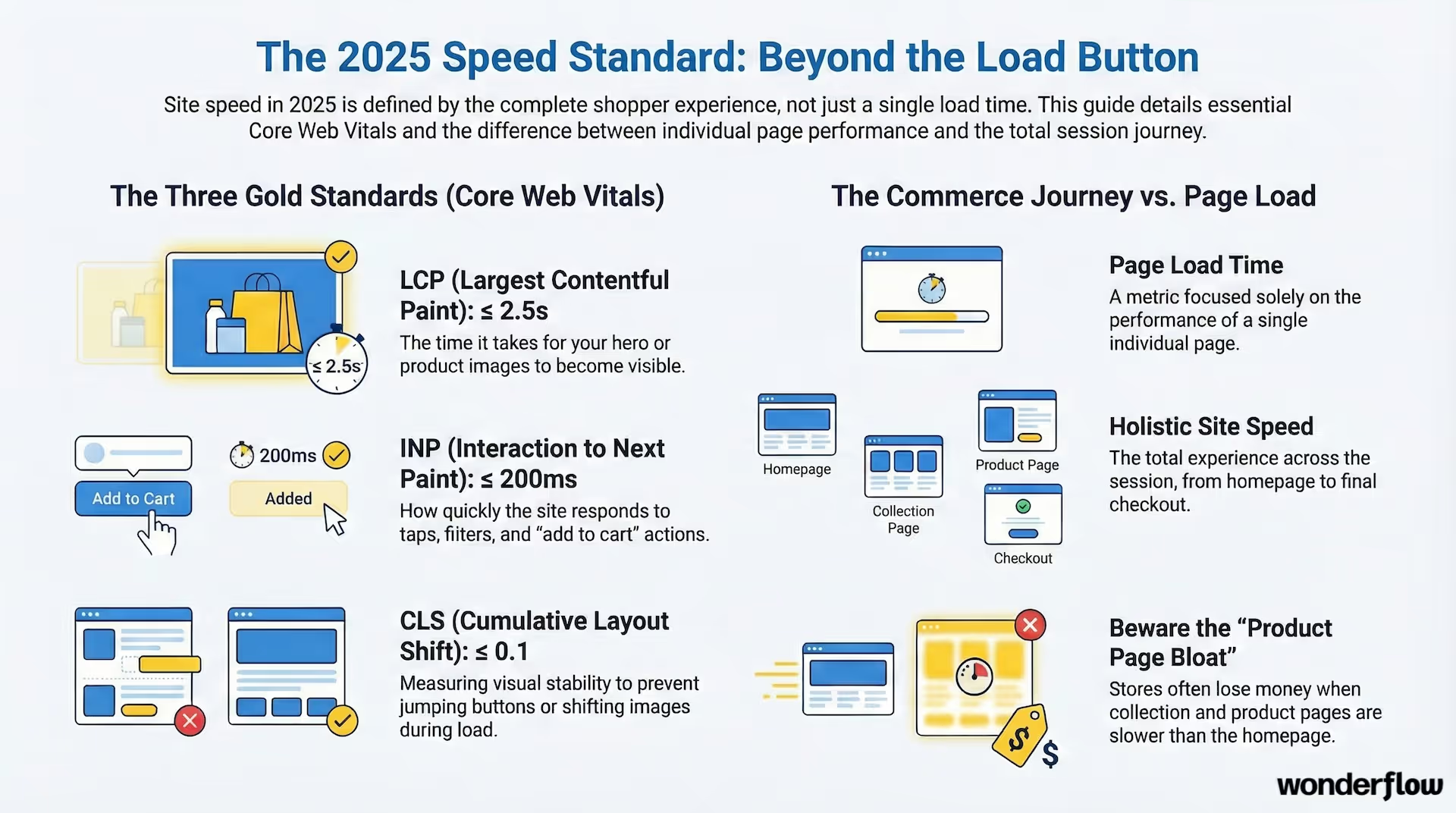
Google's Core Web Vitals are still the cleanest shorthand for "fast enough":
LCP (Largest Contentual Paint): ≤ 2.5s
When the main content (often your hero image or product image) becomes visible.
INP (Interaction to Next Paint): ≤ 200ms
How quickly the site responds when someone taps, clicks, filters, opens a menu, or adds to cart.
CLS (Cumulative Layout Shift): ≤ 0.1
How stable the page is while loading (no jumping buttons, shifting images, layout wobble).
For ecommerce, LCP and INP are the killers. LCP because product imagery is heavy. INP because ecommerce pages are interactive (variant selectors, filters, cart drawers, popups, scripts).
Also: ecommerce site speed and page load time aren't identical.
- Page load time is about a single page
- Site speed is how the experience feels across sessions: homepage → collection → product → cart → checkout
A store can have a fast homepage and still lose money if product pages or collection pages are slow. That's usually where the bloat lives.
Why Speed Hits Ecommerce Harder Than Most Sites
1) Speed affects conversion before shoppers even read
Slow loads create doubt. Doubt creates "back button." Ecommerce doesn't have the luxury of long attention spans. Shoppers are comparing tabs, prices, shipping, reviews—and they're doing it quickly.
Speed also changes behavior inside the session:
- Faster stores tend to get more pages viewed per session
- More pages viewed means more product discovery
- More product discovery usually means higher AOV (the "oh, I'll add that too" effect)
2) Speed affects SEO in two ways (not just rankings)
Yes, performance is a ranking factor. But ecommerce SEO has another big vulnerability: crawl budget and indexing efficiency.
If Googlebot hits your store and your pages are heavy, JS-rendered, or slow to respond, fewer URLs get crawled and indexed efficiently. On a site with hundreds or thousands of products, that matters.
3) Speed is a paid media multiplier
Clicks from Google Ads, Meta, TikTok—none of them are cheap anymore. When landing pages are slow, you're paying full price for partial traffic. People bounce before they even see the offer, and your CAC quietly climbs.
At Wonderflow, we see this constantly in our performance marketing work: stores spending thousands on ads while slow page load times quietly kill their ROAS.
The Ecommerce Page Speed Optimization Checklist
This is the part you can actually use. If you're short on time, do it in order. The first sections tend to produce the biggest wins the fastest.
1) Image Optimization (The Fastest Win for Most Stores)
Ecommerce sites live and die by imagery. The problem is most stores ship images like they're building a photography portfolio instead of a conversion machine.
Checklist:
✅ Compress aggressively (without destroying quality)
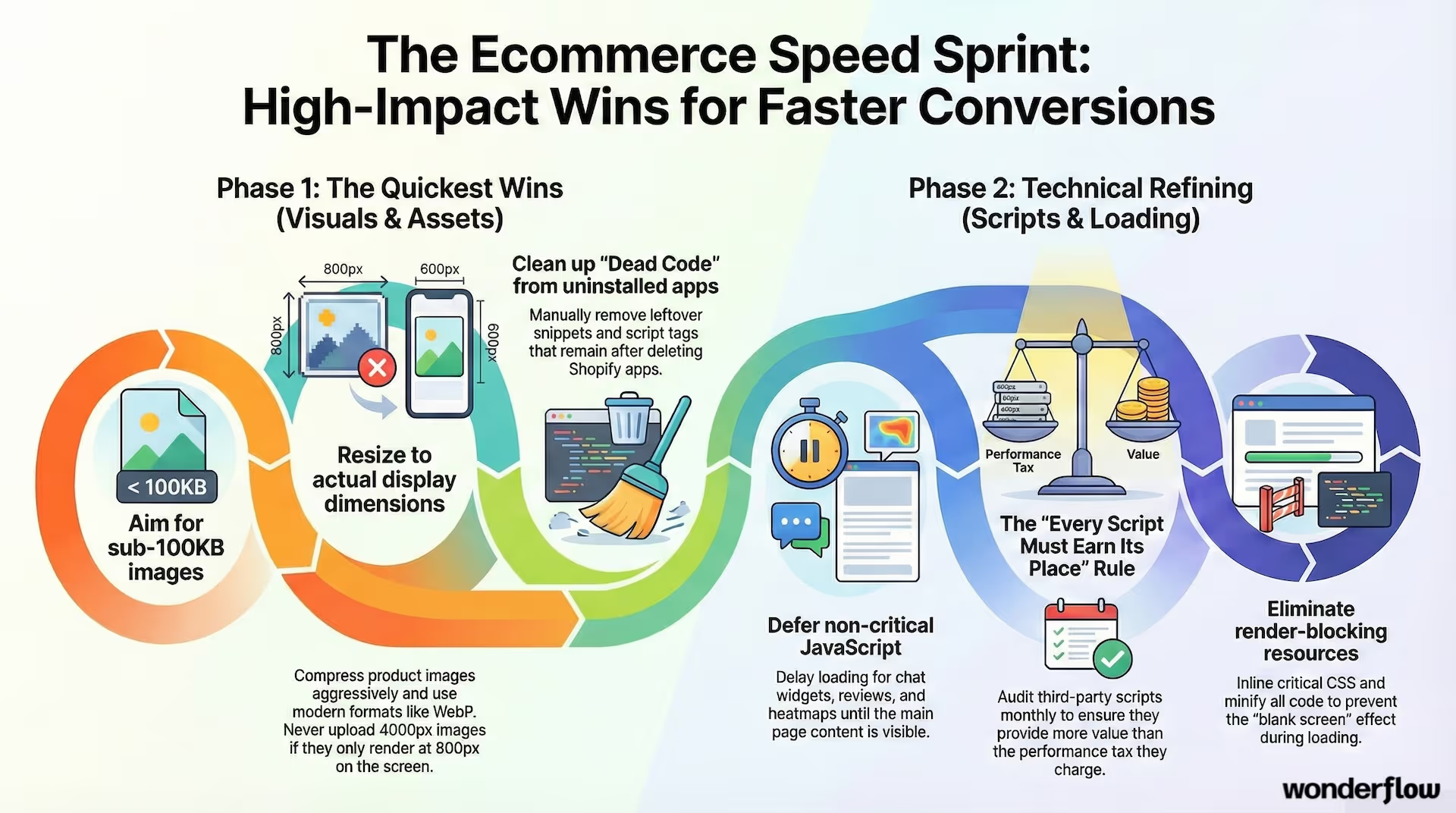
- Aim for sub-100KB wherever possible for non-hero images
- For product grids, smaller is almost always better
- Don't guess—compress and compare. A 500KB product image multiplied by 40 products on a collection page gets ugly fast
Tools like TinyPNG or ImageOptim make this painless.
✅ Use modern formats: WebP (and AVIF if you can)
- WebP is a strong baseline and widely supported
- AVIF can be even smaller, but implementation varies
✅ Resize to actual display dimensions
One of the most common ecommerce mistakes: uploading a giant 4000×4000 image and displaying it at 800×800.
Upload images closer to the size they'll actually render. If you need retina quality, you can still support that, but don't ship unnecessarily huge originals.
✅ Lazy load below-the-fold images
Lazy loading is a real win on product pages and long collections—but do it carefully:
- Lazy load images below the fold
- Do NOT lazy load the hero/LCP image
- If your main product image is lazy-loaded, your LCP will suffer
✅ Fix the "hidden" image problems
- Carousels and sliders often load multiple large images at once
- Bad galleries preload every angle even if the user never clicks
If you have a slider above the fold, you're basically paying a performance tax to look "premium."
2) Theme + Frontend Optimization (Stop Shipping Bloat)
Your theme is your store's engine. A visually beautiful theme with messy code is like a sports car towing a trailer.
Checklist:
✅ Choose a lightweight theme (or simplify the one you have)
If you're on Shopify, this matters a lot. Some themes are fast because they're clean. Others are fast because they're empty. And some are slow because they're trying to do everything.
Either way, the goal is the same:
- Limit animations
- Remove heavy carousels
- Avoid video backgrounds on key pages
- Keep the above-the-fold section lean
✅ Remove leftover app code
Uninstalling an app doesn't always remove its scripts. Many Shopify stores carry years of "dead code" that still loads on every page.
Look for:
- Snippets injected into theme.liquid
- Old script tags
- Unused CSS blocks
- App-related JS files still referenced
✅ Audit unused CSS and JS
If you've never used Chrome DevTools coverage reports, it's eye-opening. You'll often find that a huge percentage of your CSS/JS is never used on a given page—but it's still shipped.
Less shipped code = faster parsing + faster interactions = better INP.
3) JavaScript & CSS Optimization (Where INP Gets Won or Lost)
A lot of ecommerce "slowness" isn't download time—it's the browser choking while parsing and running scripts. This is where you reduce page load time ecommerce stores actually experience.
Checklist:
✅ Minify CSS and JavaScript
This is table stakes. If you're shipping unminified code, you're giving away speed for no benefit.
✅ Remove render-blocking resources
If key CSS or scripts block the first render, your site can feel blank even if it's technically "loading."
Strategies include:
- Inline critical CSS (small, targeted)
- Defer non-critical scripts
- Load non-essential styles after initial render
✅ Defer non-critical JavaScript
Not everything needs to run immediately.
Examples of scripts that rarely need to load instantly:
- Chat widgets
- Reviews widgets (controversial, but often true)
- Heatmaps and session recorders
- Pop-up engines
- A/B testing frameworks (depending on usage)
✅ Watch third-party scripts like a hawk
Third-party scripts are the biggest silent killer on ecommerce pages. Each one adds:
- Network requests
- Blocking time
- Main thread work
- Potential layout shift
Which leads to…
4) App, Plugin & Script Management (The "Every Script Must Earn Its Place" Rule)
Most ecommerce teams install apps like they're free. They're not free. You pay in performance and conversion.
Checklist:
✅ Remove unused apps (and confirm their code is gone)
This is the easiest win that people avoid because it feels like housecleaning. But it's often the difference between "barely passing" and "actually fast."
✅ Consolidate tracking scripts
Instead of installing separate app scripts everywhere, consolidate where possible (ex: using a tag manager like Google Tag Manager).
But be honest: tag managers can also become a dumping ground. The goal is fewer scripts, not just centralized scripts.
✅ Load scripts conditionally when possible
If an app only matters on product pages, it shouldn't load on your homepage, blog, and collection pages.
Conditional loading is one of the best "advanced" improvements because it reduces site-wide bloat.
5) Caching, CDN, and Server Response (Where Time-to-First-Byte Comes From)
If the server is slow, everything else suffers. If the CDN and caching are misconfigured, repeat visits won't get faster.
Checklist:
✅ Use a CDN
If you sell nationally or globally, a CDN is a must. It reduces latency by serving content closer to the user.
✅ Configure browser caching
Static assets (images, CSS, JS) should be cached aggressively so returning visitors don't redownload everything.
✅ Improve server response time (TTFB)
TTFB is affected by:
- Hosting quality
- Database performance
- Theme complexity
- App/plugin bloat
- Backend rendering work
If you've optimized front-end and you're still slow, TTFB is often the culprit.
6) Collection Pages: Control Listings Per Page (A Sneaky Ecommerce Problem)
Category/collection pages are where ecommerce website speed optimization goes to die because they combine:
- Many images
- Filters
- Sorting logic
- Product badges
- Tracking events
- Infinite scroll
Checklist:
- Implement pagination cleanly (especially for SEO)
- Avoid infinite scroll that hides products from crawlers
- Limit products per page to what's necessary
- If you must show many products, make the grid ultra-light (small thumbnails, fewer scripts)
This is where you can reduce page weight dramatically without changing your brand at all.
7) Structure + SEO Enhancements That Support Speed
This isn't a pure "performance" section, but it supports your outcomes.
Checklist:
✅ Keep architecture shallow
Your important pages should be reachable within ~3 clicks.
✅ Use clean, logical URLs and breadcrumbs
This helps both users and crawlers move efficiently through the store.
✅ Add structured data
Product schema, review schema, breadcrumb schema—these don't directly speed up the site, but they can improve CTR and visibility, which makes your traffic more valuable.
8) Plan for Traffic Surges (Because Speed Problems Multiply Under Load)
Traffic surges (sales, launches, influencer spikes) can turn a "kind of slow" store into an unresponsive store.
Checklist:
- Ensure hosting can scale
- Reduce backend bottlenecks
- Consider traffic management strategies if you run large promos
- Test performance under load (not just in a calm environment)
The worst outcome isn't "slower." It's "crashed."
Tools to Measure and Monitor Performance (Without Getting Lost)
Measurement is where people either get disciplined or spiral into dashboards.
Here's the short list that matters:
- Google PageSpeed Insights (quick diagnosis + CWV view)
- Lighthouse (more detail, useful for devs)
- GTmetrix (waterfall + bottleneck visibility)
- Chrome DevTools (coverage, performance profiling)
- Your platform's performance dashboard (Shopify has one; other platforms vary)
How to test like a sane person:
- Test mobile and desktop (mobile is usually the real issue)
- Test your money pages (collection, product, cart)
- Use incognito to reduce extension noise
- Measure before and after every change so you know what actually worked
A Simple 30-Day Speed Action Plan (So This Actually Gets Done)
If you want a clean path without getting overwhelmed, follow this.
Week 1: Quick wins (fastest ROI)
- Compress and convert images (WebP)
- Fix LCP image (don't lazy load hero/product main image)
- Remove unused apps
- Audit third-party scripts and kill the non-performers
Week 2: Theme cleanup + render priorities
- Remove leftover app code
- Reduce sliders/animations above the fold
- Minify CSS/JS
- Defer non-critical scripts
Week 3: Collection page improvements
- Reduce products per page (or optimize grid weight)
- Improve pagination and crawlability
- Reduce filter script bloat
Week 4: Infrastructure + monitoring
- Improve caching rules
- Confirm CDN is serving most assets
- Monitor Core Web Vitals
- Create a recurring monthly performance review (so it doesn't decay again)
Speed isn't "set it and forget it." Stores grow. Teams add tools. Pages bloat. Your job is to keep performance from slowly sliding back into the red.
The Payoff (What You'll Actually Notice)
When ecommerce performance optimization is real—not just score-chasing—you'll usually see:
- Higher conversion rates (especially on mobile)
- Lower bounce rates from paid traffic
- Better engagement on collection pages
- More pages per session
- Better SEO stability over time
- A store that simply feels more trustworthy
It's not glamorous work, but it's some of the most profitable work you can do on an ecommerce site.
Having page speed issues? See just how much:
Ready to Fix Your Store Speed Without Guessing?
If you want help turning this checklist into real improvements (and not just another audit doc that sits in a folder), that's exactly what we do at Wonderflow.
We'll run a focused performance audit, identify the highest-impact fixes for your storefront (theme, scripts, images, collection pages, Core Web Vitals), and prioritize changes based on what will move revenue, not just Lighthouse scores.
Planning your optimization work is easier when you can see the full picture. Try the Wonderflow app to map out your performance optimization flow, track progress, and collaborate with your team on implementation.
Get a performance marketing audit from Wonderflow →
If you want Wonderflow to help you speed up your ecommerce website and stop losing sales to slow load times, reach out and we'll map out a clear, prioritized plan—quick wins first, deeper fixes next, and tracking in place so you can prove the lift.
.jpg)
.avif)
.avif)