


.avif)


Browse all articles
If you're working on page speed optimization, you're not just chasing a better Lighthouse score. You're protecting your conversion rate.
Because here's the reality: in 2026, most marketing teams aren't losing leads because their ads are bad. They're losing leads because the page experience can't keep up with the click. Slow load times create hesitation, increase bounce, and quietly turn paid traffic into wasted spend.
This is a practical page speed optimization guide for teams who want to improve page speed, strengthen Core Web Vitals, and convert more of the traffic they're already paying for.
We'll cover:
- What Core Web Vitals are and why they matter
- How page speed affects conversions (and where it matters most)
- Exactly how to reduce page load time with high-impact fixes
- A prioritized page speed optimization checklist
- A simple workflow to keep performance strong over time
This isn't theory. It's how you turn speed into measurable growth.
What is Page Speed Optimization?
Page speed optimization is the practice of improving how quickly a page loads, becomes interactive, and stays visually stable as it renders. It's not just "load time." It's the full experience a user feels from the moment they click to the moment they can act.
In practical terms, website speed optimization usually comes down to:
- Reducing page weight (especially images and video)
- Limiting render-blocking CSS and JavaScript
- Improving server response time
- Controlling third-party scripts (analytics, chat, widgets)
- Using caching and a content delivery network (CDN)
- Prioritizing above-the-fold content so users see value quickly
If you've ever wondered why is my website so slow, the answer is usually one of those categories—or a combination.
Why Is Page Speed Important for Conversions?
Because speed is friction. And friction kills momentum.
If someone clicks an ad or a search result, they're giving you a tiny window of attention. A slow site burns that window before the visitor even sees your offer.
This is the real story behind:
- slow website conversions
- ad clicks but no leads
- rising acquisition costs
- "traffic is up but revenue isn't"
Page Speed and Conversions: What's the Connection?
Here's the simplest explanation:
- Faster pages reduce doubt
- Reduced doubt increases action
- Increased action improves conversion rate
Or put another way: page speed affects conversion rate because it changes the user's willingness to continue.
When website loading speed is slow, you'll see:
- Higher bounce rates
- Lower engagement (less scrolling, fewer clicks)
- Fewer form submissions / checkouts
- Lower-quality leads (the most motivated users still push through)
In a crowded market, speed is a competitive advantage. Not because "fast is cool," but because fast feels trustworthy.
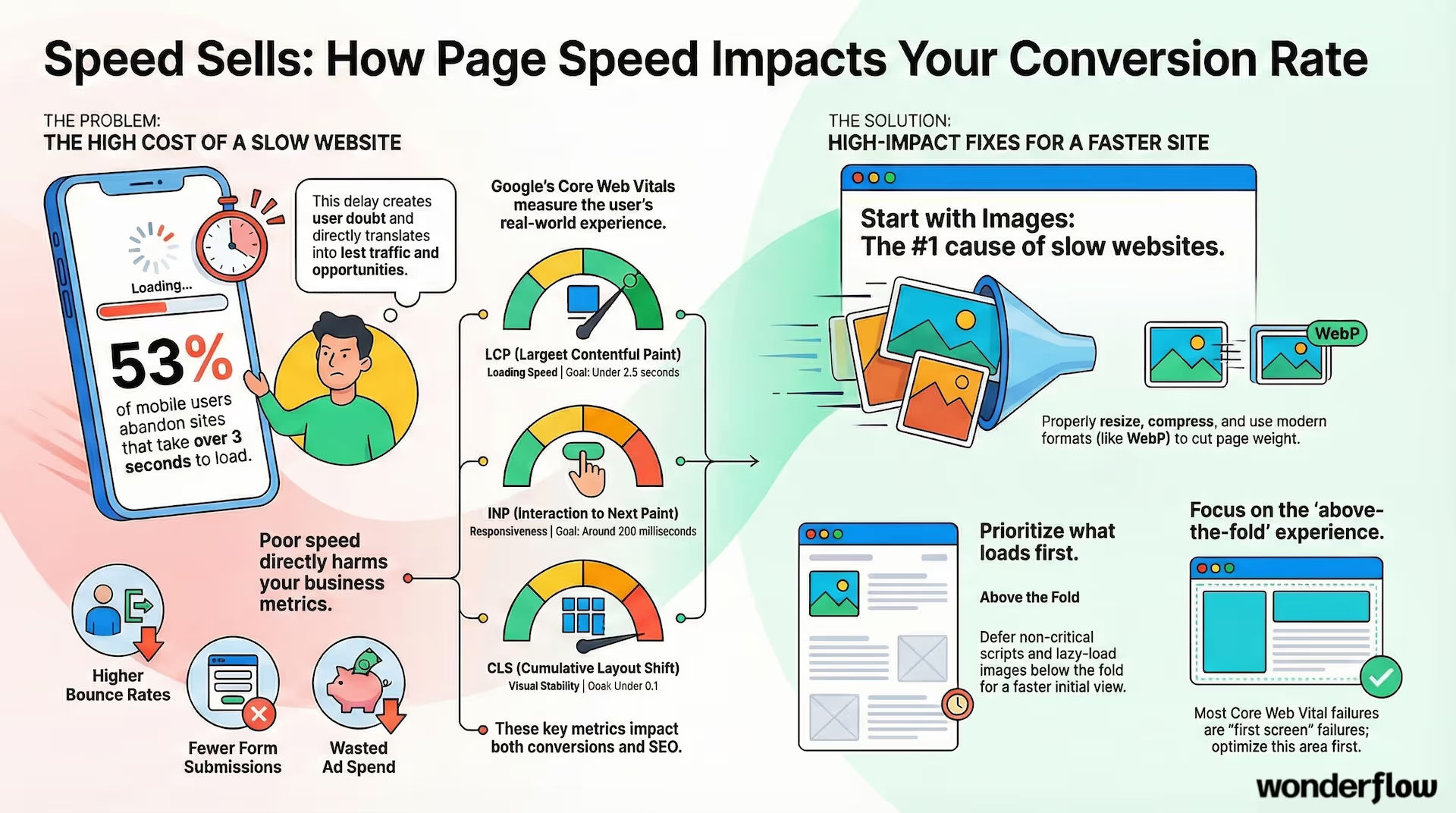
According to Google's research on mobile page speed, 53% of mobile users abandon sites that take longer than 3 seconds to load.
What Are Core Web Vitals?
Core Web Vitals are Google's user-experience performance metrics that measure how fast a page loads, how responsive it feels, and how stable it is while loading. They matter because they affect:
- conversion performance
- user experience (especially mobile)
- and SEO visibility (more on that soon)
The three Core Web Vitals are:
Largest Contentful Paint (LCP)
LCP measures how quickly the main content loads (usually the hero section or largest element above the fold). If LCP is slow, your page feels slow—even if the rest loads quickly.
Goal: Improve largest contentful paint to under 2.5s.
Interaction to Next Paint (INP)
INP measures responsiveness, meaning: when a user clicks or taps, how quickly the page responds. INP replaced FID as the main interactivity metric.
Goal: keep INP around 200ms for a "snappy" feel.
Cumulative Layout Shift (CLS)
CLS measures visual stability. If buttons jump around while loading, your page feels broken—even if it's fast.
Goal: reduce cumulative layout shift to under 0.1.
You can have a beautiful site with great copy—and still lose conversions if your Core Web Vitals are poor.
Learn more about Core Web Vitals on Google's Web Vitals guide.
How Does Page Speed Affect SEO?
How does page speed affect SEO? Directly and indirectly.
Directly: speed is a ranking factor, especially on mobile. Core Web Vitals are part of Google's Page Experience signals.
Indirectly: slow sites increase bounce and reduce engagement, which weakens the signals Google uses to evaluate content quality.
Even if rankings don't immediately drop, slow pages often underperform because:
- fewer visitors stick around
- fewer pages get crawled efficiently
- fewer users convert, leading to weaker overall performance signals
If you're investing in content, website performance optimization makes that investment convert.
Our Webflow development services include built-in performance optimization to ensure your pages load fast from day one.
What Is a Good Page Load Time?
There's no one perfect number, but here's a practical benchmark for most marketing sites:
- Under 3 seconds: solid
- Under 2.5 seconds: competitive
- Over 4 seconds: you're leaking conversions
If you're running paid traffic to landing pages, your goal should be even tighter—because paid clicks are expensive and impatient.
If you're asking how long should a page take to load, aim for:
- LCP under 2.5s
- "Time to interactive" that feels immediate
- no layout shifting while content appears
This is the standard for "conversion-ready" performance.
How to Check Page Speed and Core Web Vitals
If you want to how to check page speed properly, you need two types of data:
- Lab data (simulated tests)
- Field data (real user experience)
Tools to Use for Page Load Time Optimization
- Google PageSpeed Insights: best all-around view (lab + CrUX field data)
- Chrome DevTools: developer-level debugging
- GTmetrix: waterfalls + file-by-file breakdown
- WebPageTest: more detailed diagnostics across geographies/devices
How to Test Page Speed (The Right Way)
When you how to test page speed, don't just test the homepage.
Test:
- your top landing pages
- your highest-traffic SEO pages
- your "money" pages (pricing, demo, checkout)
- mobile first (because mobile reveals problems faster)
And always record the baseline before making changes.
What Slows Down a Website?
If you're wondering what slows down a website, the most common culprits are predictable:
- Oversized images (by far the #1 issue)
- Too many scripts (especially third-party)
- Render blocking resources (CSS/JS that blocks the first paint)
- Slow server response time (TTFB)
- Heavy fonts and unoptimized media above the fold
- No caching, weak caching, or no CDN
- Bloated page structure (too many elements/DOM)
The good news: most of these are fixable with a few high-impact changes.
Page Speed Best Practices That Actually Move the Needle
This section is your practical "do this first" list—your real-world speed optimization techniques.
1. Optimize Images for Page Speed
If you do only one thing, do this.
Optimize images for page speed by:
- resizing images to their display dimensions
- compressing before upload
- using modern formats like WebP or AVIF
- avoiding huge background images where possible
Images often account for most of a page's weight. Cutting image payload is the fastest way to reduce page load time.
Quick win: audit your heaviest images first (PageSpeed Insights will show you).
2. Lazy Loading Images (Below the Fold)
Lazy loading images means they don't load until the user scrolls near them. This makes the initial load much faster.
Do this for:
- content sections below the fold
- long pages (blogs, product pages)
- embedded video previews
Be strict above the fold: load only what the user needs to decide they're in the right place.
3. Minify CSS and JavaScript
To minify CSS and JavaScript means removing unnecessary characters and reducing file size. This helps pages load faster and reduces blocking.
In addition:
- remove unused CSS/JS
- split scripts so only essential code loads first
- avoid loading big libraries for small features
A common performance trap is "small features" powered by huge script bundles.
4. Eliminate Render Blocking Resources
Eliminate render blocking resources by ensuring your page can display meaningful content before heavy scripts finish loading.
Tactics include:
- deferring non-critical JavaScript
- moving non-critical CSS out of the critical path
- inlining critical CSS for above-the-fold content
The goal isn't "load everything instantly." It's "show the value instantly."
5. Reduce Server Response Time (TTFB)
If you want to reduce server response time, focus on:
- better hosting / server configuration
- caching
- reducing backend processing for dynamic pages
- ensuring your CMS isn't overloaded with plugins/apps
TTFB issues show up as "the page doesn't even start loading." That's fatal for conversions.
6. Enable Browser Caching
Enable browser caching so returning visitors don't re-download the same assets (images, CSS, JS).
Even if most traffic is new, caching still matters for:
- paid retargeting
- multi-page sessions
- repeat visits from organic content
Caching is one of the simplest forms of website speed optimization that pays off over time.
7. Use a Content Delivery Network (CDN)
A content delivery network (CDN) stores your assets on servers around the world. Users load files from a location near them, reducing latency.
CDNs are especially useful if:
- you have national/global traffic
- you rely on large assets
- your pages include multiple static resources
A CDN is a foundational part of website performance optimization at scale.
8. Optimize Web Fonts
Optimize web fonts because fonts often block rendering and slow LCP.
Best practices:
- use fewer font families and weights
- preload the primary font used in the hero
- prefer modern formats (woff2)
- avoid loading fonts you don't need
Fonts are an invisible performance tax—until you fix them.
9. Improve First Contentful Paint (FCP) by Simplifying the First View
To improve first contentful paint, prioritize:
- fewer above-the-fold scripts
- lighter hero media
- quick-rendering headline + CTA
- minimal layout complexity
FCP is the "is this page working?" moment. If that moment is slow, bounce rises.
10. Improve Core Web Vitals with Above-the-Fold Discipline
If you want to improve core web vitals, start here:
Optimize above the fold content so:
- the hero loads fast (LCP)
- the first interaction works smoothly (INP)
- nothing shifts around while loading (CLS)
Most Core Web Vital failures are "first screen" failures.
Learn more optimization techniques on Google's Web Performance guide.
Page Speed Optimization Checklist (Prioritized)
Here's a practical page speed optimization checklist you can run every month:
High Impact (Do First)
- Compress + resize images (WebP/AVIF)
- Lazy load below-the-fold media
- Defer non-critical scripts
- Remove unused third-party tools
- Preload hero image and primary font
Medium Impact (Next)
- Minify CSS/JS and remove unused code
- Add/validate caching policies
- Implement CDN for static assets
- Fix layout shift causes (CLS)
Advanced (As Needed)
- Reduce server response time / upgrade hosting
- Inline critical CSS
- Refactor JavaScript-heavy components
- Introduce performance budgets + monitoring
Page Speed Optimization by Business Type
Not all sites prioritize the same pages. Your strategy changes by business model.
Page Speed Optimization for Ecommerce
Speed matters most on:
- product pages
- collection pages
- checkout
You're optimizing for:
- add-to-cart rate
- checkout completion
- mobile performance
Page Speed Optimization for SaaS
Speed matters most on:
- pricing pages
- demo/trial landing pages
- onboarding flows
You're optimizing for:
- clarity
- trust
- form conversions
Lead Gen / Services
Speed matters most on:
- landing pages
- "contact" or "book" flows
- high-intent SEO pages
You're optimizing for:
- call-to-action completion
- lead quality
- reduced bounce
How to Improve Page Speed Without a Developer
Yes, you can make meaningful improvements without writing code.
If you're asking improve page speed without developer, start with:
- image compression + format conversion
- removing unused third-party scripts
- simplifying above-the-fold media
- reducing font weights
- using a CDN (often simple to enable)
- setting lazy loading for images
Most teams can get major wins just by reducing payload and removing bloat.
How to Improve Core Web Vitals Score (A Simple Workflow)
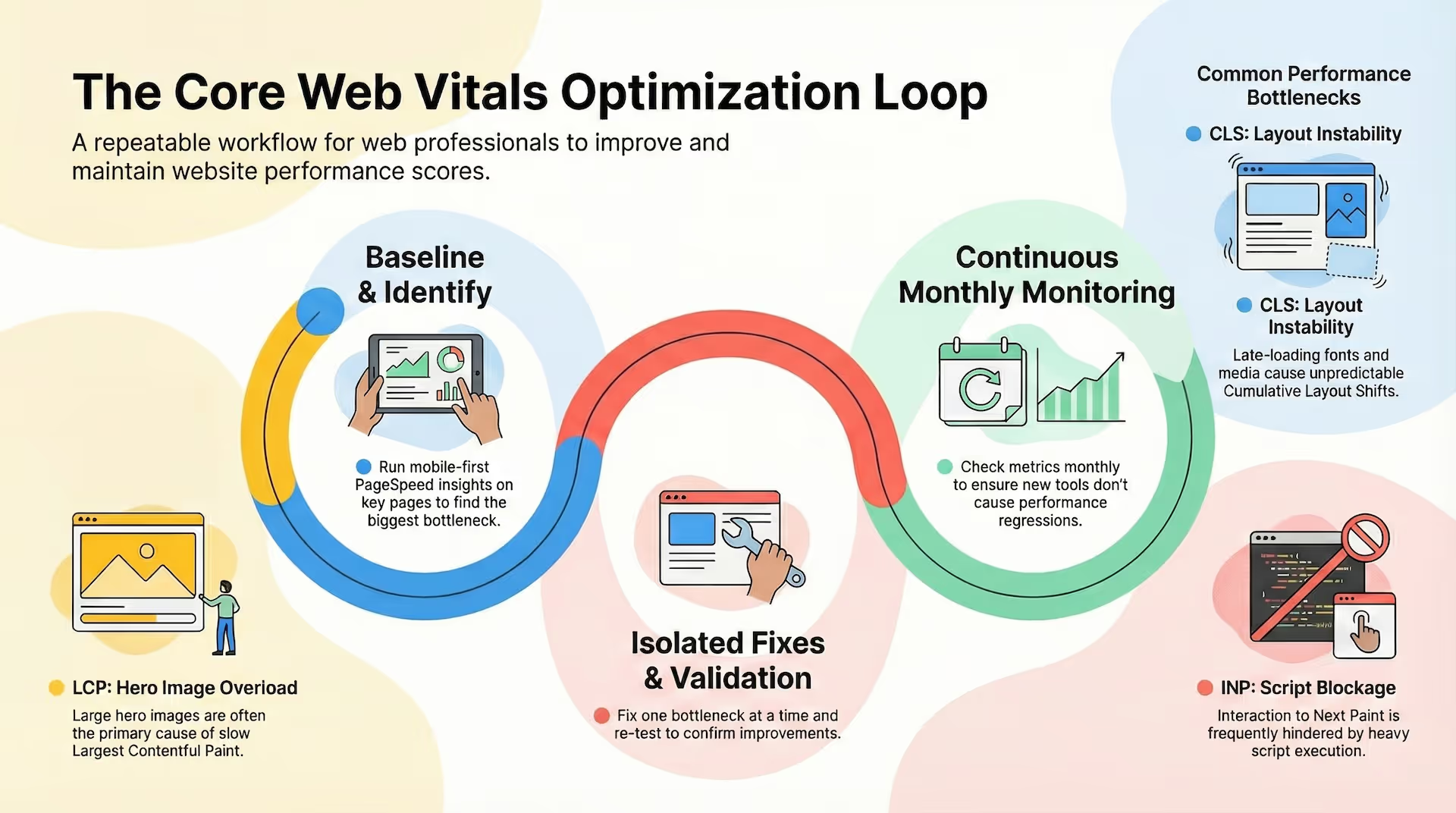
If you want a repeatable method to improve Core Web Vitals, use this loop:
Step 1: Measure Your Baseline
Run PageSpeed Insights on:
- one key landing page
- one key SEO page
- mobile first
Step 2: Identify the Top Bottleneck
Common bottlenecks:
- LCP is a huge hero image
- INP is blocked by heavy scripts
- CLS is caused by late-loading fonts or media
Step 3: Fix One Bottleneck at a Time
Don't attempt 20 fixes at once. You won't know what worked.
Step 4: Re-test and Validate
Confirm improvements:
- in PageSpeed Insights
- and in real conversion metrics
Step 5: Monitor Monthly
Performance regresses when teams add new tools. Monitoring prevents surprise slowdowns.
Does Page Speed Affect Conversions? Yes—But It's Not the Only Lever
Let's answer the question directly: does page speed affect conversions? Absolutely.
But one nuance matters:
The fastest page isn't always the highest-converting page.
Speed is a foundation. It removes friction. But conversion is also about:
- message clarity
- trust signals
- offer strength
- form design
- intent alignment
That's why Wonderflow treats speed as part of the flow—because speed alone doesn't fix a broken journey, but it makes every other improvement work better.
See how our process works to optimize your entire customer journey.
Putting It All Together: Speed as Part of the Flow
At Wonderflow, we don't treat page speed like a technical side quest. We treat it like what it is:
A conversion lever.
In a real flow, speed impacts:
- the cost of paid traffic (landing page experience signals)
- SEO performance (Core Web Vitals + engagement)
- lead quality (less drop-off, more focused visitors)
- overall conversion efficiency (less friction at the moment of decision)
That's why our approach is always end-to-end: ads, landing pages, conversion path, tracking, follow-up. When those pieces work together, performance compounds.
If you're investing in growth, optimize web performance like you would any core metric—because it's connected to everything downstream.
Our Marketing Performance Subscription includes page speed optimization as part of every flow we build.
FAQs: Page Speed Optimization + Core Web Vitals
How to make website load faster?
Start with images and scripts. Compress media, lazy load below fold, defer non-critical scripts, and remove third-party tools you don't need. Then validate with PageSpeed Insights.
How long should a page take to load?
A solid target is under 3 seconds overall, with LCP under 2.5 seconds. Over 4 seconds usually creates noticeable conversion loss.
How to optimize website for mobile speed?
Test mobile first, simplify above-the-fold content, reduce page weight, and limit scripts. Mobile devices reveal performance issues faster than desktop.
How to improve page speed quickly?
Optimize images, lazy load below the fold, and defer scripts. Those three changes often create the biggest immediate lift.
What are the three Core Web Vitals?
The three Core Web Vitals are: Largest Contentful Paint (LCP) which measures loading performance, Interaction to Next Paint (INP) which measures interactivity, and Cumulative Layout Shift (CLS) which measures visual stability.
How does page speed affect SEO rankings?
Page speed is a direct ranking factor, especially on mobile. Google's Core Web Vitals are part of Page Experience signals. Slow sites also increase bounce rates and reduce engagement, which indirectly weakens ranking signals.
What is the best tool to test page speed?
Google PageSpeed Insights is the best all-around tool as it provides both lab data (simulated tests) and field data (real user experience from Chrome users). For deeper diagnostics, use GTmetrix or WebPageTest.
Got a slow page wasting your ad spend? See just how much:
Final Takeaway: Faster Pages Convert More—Because They Waste Less Attention
Speed is one of the few improvements that helps every channel:
- SEO
- paid ads
- social
- direct traffic
If your site is slow, you're paying for attention you can't keep.
Start small:
- pick one high-traffic landing page
- run PageSpeed Insights
- fix the biggest bottleneck
- validate the result
That's how page load time optimization becomes conversion growth.
And if you want help improving speed inside a full conversion system, the best starting point is a focused flow—one page, one goal, one set of improvements you can actually measure.
👉 Start with a 15-Day Flow Setup
.jpg)
.avif)
.avif)